
Wow, modern life is demanding!
We do so much more than previous generations. We don’t just study but have to work as well. And even then, we have to finish our studies in the blink of an eye – or end up deeply in debt if we don’t.
My father spent nearly a decade in school and I had to finish both my bachelors and my masters in less than half that time!
Fortunately, it’s not all bad news. There are a lot of new technologies and tools for students which can help us save time and make our lives easier.
Here, we’ll discuss some of the best tools to do exactly that so that you’ll have all of these options to compensate for all the world’s demands. Even better, all of these are free so you don’t have to end up even more in debt for using them.

No, I’m not going to preach about search. If you haven’t figured out how to use google for that yet, then you’re in trouble. Rather, I’m talking about all the other services which often get overlooked but are just as essential.
The main tools are:
- Hangouts
- Docs
- Sheets
- Gmail
All these four technologies have been integrated with each other. It means that you can switch between them in no time. This makes them all particularly useful for you to use when you’re working together with other people on projects.
You can edit documents at the same time as other people, share them between each other and discuss them even while you’re not sitting in the same space. That’s some serious time saving – and it’s all free!
Writing apps
There are a lot of reading tools out there you can use but for me, there are three obvious ones that I swear by. These are Grammarly, Hemingway app, and Citatior.
- Grammarly is great because it will check your text for spelling and grammar mistakes. Even in its free version, it can often help you see mistakes that even Word doesn’t pick up on.
- The Hemingway App, in the meantime, is a program that points out running sentences, overuse of the passive voice, and when you use too many adverbs. Reduce this number down and you make your text far more readable and accessible.
- And Citatior, in the meantime, is my go-to tool to help me write up citations for my articles. Because I really can’t be bothered to learn whether I need to put a comma or a point there – particularly as they’re going to change it all again when they roll out the next MLA guide.
Together, these three tools make the editing and correcting essays a cinch. You can spend less time thinking about grammar and formatting requirements and focus more on coming up with great essay topics and the content itself. And that means writing those essays becomes a great deal easier.
See Also: How to Find The Best Essay Writing Service for Students
Figure out where you’re wasting time
Let’s be clear, there are always places where you’re wasting time. And sure, you might be aware of some of them, but the truth is, you’re probably wasting time in places that you haven’t even considered.
To get back some of that time, the best thing to do is use a time tracker. There are a lot of them out there and they all have their advantages and disadvantages. My favorite, however, is TimeCamp. It integrates with a huge pile of other apps and lets you figure out where you’re actually spending your time.
Then, when you realize how much time you’re spending on certain platforms, you’ll start figuring out how to reduce that time so that you’re more efficient. You can also use this to track billable hours, but then the software is no longer free.
Memorization apps
Memorizing for tests is labor intensive. What’s more, you almost always have to try to squeeze it into a limited number of days. For that reason, anything that can help you save time with memorization is going to be very useful.
A good app for that is Anki. It will allow you to create flashcards. What’s even better is that it will figure out how often you need to have a certain flash card repeated in order to remember it – based on how well you’re remembering it.
Another great advantage of this app is that you don’t have to go through the entire pile. Instead, the software shows you only those cards you’re struggling to learn.
I found the best way to use this software was to make flash cards of the stuff I felt I needed to memorize, then taking fifteen minutes or so to go through them every day. It can cut your study time for exams down significantly.
Scheduling app
No, just writing down one long to-do list isn’t going to get you very far. A much better idea is to use one of the many apps that are out there. Which one is best? That’s a personal choice. Nonetheless, I rather happen to like Week Plan.
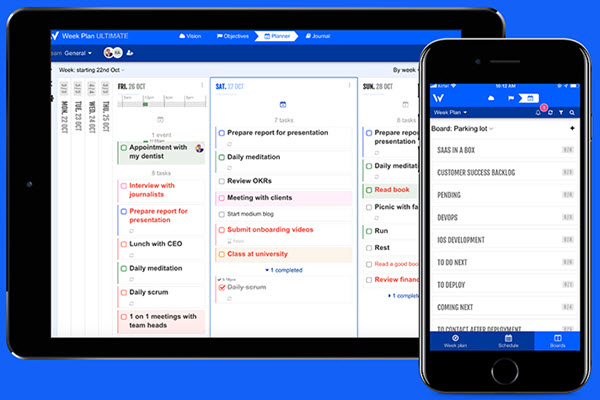
Why? Because of the visual nature. It puts today on the left and then stretches out the week to the right. In this way, I’ll know not just what I’ve got to do today, but also what I’ve got looming later on in the week.
I can also easily see if something can be pushed or if I just have to bite the bullet and keep going as I’ve got enough deadlines looming.
The ticket is routine
Yes, these are some useful apps and I certainly advise that you use them. The thing is, they’ll only work if you build up a routine in using them. A lot of us end up trying out eight new things and because it’s too much none of them stick.
For that reason, my suggestion is to try out only one or two of these and see which really work for you. If they do, then sit down and make it a habit. That’s going to help you far more than spending time learning how to use a new app and then not actually using it when you do.